


Orlando Sentinel
2.3303.00 Reviews
App Specs
- Version
- 10.0.60
- Updated On
- License
- Free
- Downloads
- 50,000+
- Developer
- Tribune Publishing Inc.
- Categories
- News & Magazines
- Platform
- Android
Screenshots
 Analysis by AppCompare
When I decide whether to keep a local news app on my phone, I ask a practical question: does it help me understand what is happening nearby without making every check-in feel like work? The Orlando Sentinel is built around news for the Orlando area, so its value depends less on how many headlines it can show and more on whether local reporting is what I want in my daily mix.
Start with the kind of news you need
This is a free news and magazines app from Tribune Publishing Inc., with optional in-app purchases ranging from $4.99 to $199.99 per item. That makes it easy to try, but “free to install” and “free access to everything” are not necessarily the same thing. If I were deciding whether to rely on it, I would first open the stories I care about and see which ones I can read before treating it as a complete replacement for other news sources.
The app is aimed at readers who want Orlando-centered coverage, not people looking for a neutral, all-in-one feed of every topic and region. The distinction matters. A broad news aggregator is usually better when I want to scan many publishers in one sitting; a local newspaper app makes more sense when community decisions, area events, local sports, and developments close to home deserve their own attention.
Its audience rating is Everyone, and it has been available since Jan 20, 2011. The current version is 10.0.52, and it requires Android 8.0 or later. Those details help set expectations for compatibility, but they do not tell me whether it suits my reading habits. The useful test is whether the coverage and reading experience give me enough reason to return.
Where a local publication has an edge
The clearest reason to choose a local outlet is context. A national headline can tell me that something happened; local reporting can help me follow how it affects a particular neighborhood, public service, or community discussion. If I live in the area, work there, or have family there, that focus can save me from piecing together scattered updates from general news feeds.
One realistic routine would be checking the app over breakfast, opening a local story that affects the day, and returning later when a developing issue has changed. I would use alerts selectively rather than allowing every update to interrupt work. That is a small but useful habit: local news can be valuable precisely because it is specific, yet constant notifications can turn useful awareness into noise.
For someone who follows Orlando from elsewhere, the app can also serve as a focused window into the area. That is different from casually browsing national headlines. I would use it to keep track of a place I care about, while still turning to a wider news source for international stories or viewpoints beyond the publication’s coverage.
Worth Reading Before You Choose

EA SPORTS FC Mobile 26 Is a Bigger Football Game, but It Takes Time

Flipboard Shows What News Apps Must Do Beyond the Feed

Switching to Android Auto Means Rethinking Your Driving Routine

Google Calendar Makes a Crowded Week Easier to Manage

Ludo King Makes the Most of the Minutes Between Plans

Baby Panda World Brings Quick Play to Modern Phones, but Its Game Library Feels Busy
Using the app as part of a news routine
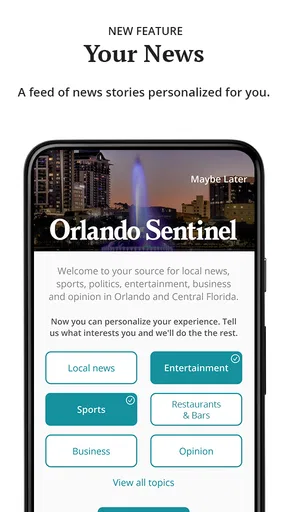
The store description positions the experience as customizable and centered on premium storytelling. In practice, I would treat customization as a way to make a local reading routine more relevant, not as a promise that the app will know exactly what I want. It is worth revisiting selected topics when my interests change—for example, following local sports during a season and then shifting attention toward civic coverage. That keeps the feed useful without expecting one fixed setup to serve every purpose.
Make reading time work for you
A good approach is to separate quick checks from deeper reading. I might scan the main local coverage when I have a minute, then save my attention for longer pieces when I have time to concentrate. If I am comparing two reports about the same local issue, I would read beyond the headline and note what each article actually establishes. That is more reliable than treating a notification or a short preview as the whole story.
Readers often want to know whether they need an account or subscription before they can judge the app. Because paid access is part of the purchase model, I would check the access prompt on the particular story I want and review any purchase terms before committing. A sensible test is to explore the available reading experience first, then decide whether the material I want justifies paying. The presence of in-app purchases is a reason to make that choice deliberately, not a reason to assume every article is locked or every story is included.
Another useful distinction is between following local reporting and using an app as a live utility. When a developing event matters, I would check the time and context of the reporting rather than assume that a newspaper app functions like an emergency alert service. For immediate safety instructions, official local channels are the better place to verify what to do; the newspaper can add reporting and background, but those roles are not interchangeable.
Where other choices may fit better
If I mainly want a wide selection of national and international headlines, a general news aggregator is likely the more convenient starting point. It can bring different publishers together, while this app’s reason to exist is its connection to Orlando. If I only want weather, a dedicated weather service is a more direct tool than opening a news publication. And if I need a comprehensive view of a national subject, I would pair local coverage with sources that specialize in that subject rather than expecting one local app to cover everything.
There is also a trade-off in relying on a single publication. A focused source can make local stories easier to follow, but it naturally reflects one newsroom’s selection and presentation of events. When a story affects an important decision, I would compare its reporting with primary information from the relevant public body or another credible outlet. This is not a criticism unique to this app; it is a sensible way to read any publication, especially when a headline is only the first step in understanding a complicated local issue.
The rating is 2.3 on average from 596 ratings, alongside 303 written reviews. I would take that as a reason to try the app with realistic expectations rather than as a complete verdict on whether it will work for me. Ratings can capture different devices, expectations, and experiences. Before making it a daily habit, I would check how it behaves on my own phone and whether the stories I want are accessible in a way that fits my budget.
Small decisions that improve the experience
I would be selective about notifications from the start. Breaking updates can be helpful for a major local development, but if every category is allowed to compete for attention, the app becomes another source of interruptions. Choosing only the subjects I genuinely follow—and muting them temporarily when I need quiet—keeps the value of alerts tied to actual interest.
For longer reading, I would avoid opening a story in the middle of a rushed task and then judging the whole experience by a few lines. Local reporting often makes more sense with the surrounding details, names, and chronology in view. A practical workflow is to use a headline check to decide whether a topic matters, then return to the full article when I can give it proper attention. That helps distinguish a useful publication from a stream of headlines I merely glance at.
It is also worth thinking about what “local” means for me. Someone who lives in Orlando may want frequent community updates; a former resident may only need occasional checks; a visitor may care about a narrow set of practical developments. Those readers should not configure or evaluate the app in the same way. I would give it a fair trial based on my actual connection to the area, rather than expecting the same level of relevance every day.
Who should keep it, and who should pass
I would recommend trying it if Orlando is part of your everyday life or a place you follow closely, and if you value a publication focused on local storytelling. It may also suit a reader who already uses broader sources but wants one place to check what those sources might not emphasize: the local angle. The app has 50K+ installs, but popularity alone is not the deciding point; relevance to your own routine is.
I would skip it if I rarely follow Orlando news, want one app to cover every region and subject, or do not want to encounter optional paid access. In those cases, a broad news reader, a publication focused on your home area, or a free public information source may be a better fit. That is not a failure of the app; it is a mismatch between a location-focused newspaper and a reader whose needs are elsewhere.
Switching from another news app does not need to mean abandoning it. I would keep a general source for wider coverage and use this one only for the local beat, then see whether that division reduces repetitive headlines. If it does, the apps complement each other. If I find myself opening both for the same broad stories and rarely using the local coverage, there is little reason to add another stop to my routine.
My recommendation after weighing the trade-offs
The Orlando Sentinel makes the most sense as a focused companion for people who care about Orlando, rather than as a universal news destination. Its main strength is the promise of a local lens and premium storytelling; its main decision points are whether that coverage matches your interests and whether any paid access is worth it to you. I would start with a few topics I genuinely follow, keep alerts restrained, and judge the app by the quality and usefulness of the reading I actually do.
Overall, I would give it a try if local reporting is missing from my current routine, while keeping another source for broader coverage and official channels for urgent instructions. If Orlando is not a place I need to follow, I would choose a different app rather than expecting this one to become a general-purpose news service. That is the clearest way to decide: install it for its local focus, not simply because it is another news icon to add to the phone.
Getting Started – First Impressions
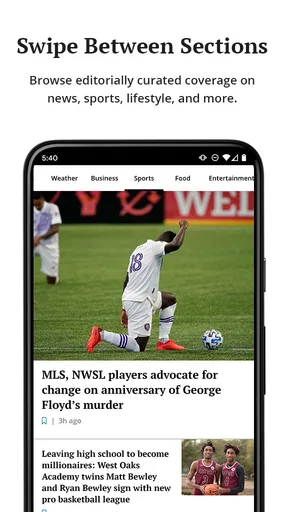
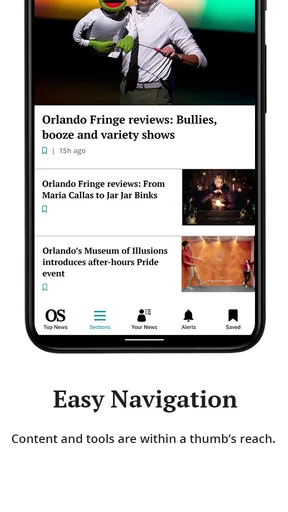
From the moment I launched the app, Orlando Sentinel made a good impression with its clean and user-friendly interface. Setting it up was a breeze, and within minutes, I was scrolling through a plethora of local news stories, features, and updates. The app’s design is intuitive, and navigating through different sections felt like second nature. You know that satisfying feeling when things just work? Yeah, that’s what I’m talking about.
Features That Stand Out
Now, let’s talk features. The app isn’t just about reading the news; it’s about experiencing it. Here’s a breakdown of what caught my eye:
- Local News Coverage: Staying connected to the community has never been easier. From city council meetings to local sports, the app covers it all with up-to-date articles and breaking news alerts.
- Personalization: Customize your news feed based on your interests. Whether you're into politics, entertainment, or sports, you can tailor what you see so you’re always in the know about what matters to you.
- Interactive Weather: The weather feature is not just a simple forecast. It includes detailed radar maps and alerts, keeping you prepared for Florida’s ever-changing climate.
- Multimedia Content: Engaging videos and photo galleries bring stories to life, adding depth and context to your reading experience.
Daily Use – What to Expect
Using the app on a daily basis, I found it to be a reliable companion. Notifications are timely and informative without being overwhelming. I was pleasantly surprised by the app’s efficiency in delivering the latest news without a hitch. There’s something quite satisfying about having everything you need in one place, especially when it’s crafted so thoughtfully.
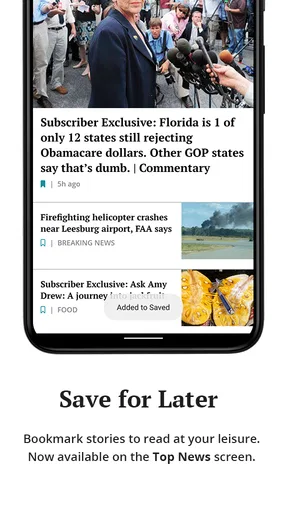
Another noteworthy feature is the offline reading option. For those moments when Wi-Fi is sketchy, you can download articles to read later. Perfect for keeping up with the news on the go.
Extra Perks – Beyond the Basics
The app also offers some great extras. For those who enjoy digging deeper into stories, the app includes opinion pieces and editorials that provide diverse perspectives. There’s also a section for popular columnists, which is a nice touch for fans of their work. Plus, if you’re someone who likes to stay informed on a national scale, the app features select national news highlights as well.
Final Thoughts – Is It Worth It?
If you’re living in or around Orlando, or simply want to keep up with the latest happenings there, this app is a must-have. It’s not just an app; it’s a gateway to the community, offering a rich tapestry of news and stories that matter. Sure, there are a million news apps out there, but this one feels unique with its local flavor and personalized touch.
In conclusion, whether you’re a news junkie, a casual reader, or someone who just wants to stay informed, this app delivers. It’s reliable, easy to use, and packed with features that make staying connected a pleasure. So, go ahead, give it a whirl, and see for yourself how it transforms your news experience!
Pros
- Comprehensive local news coverage.
- User-friendly interface.
- Timely notifications for breaking news.
- Customizable news categories.
- Offline reading mode available.
Cons
- Ads can be intrusive at times.
- Occasional app crashes reported.
- Limited national news coverage.
- Some features require a subscription.
- Slow loading on older devices.
FAQs for Orlando Sentinel
What is the Orlando Sentinel app and what features does it offer?
The Orlando Sentinel app is a mobile application providing access to the latest news, sports, entertainment, and weather updates from the Orlando Sentinel newspaper. Key features include personalized news alerts, live streaming of events, access to photo galleries, and the ability to save articles for offline reading. It's designed to keep users informed about local and national news on the go.
Is the Orlando Sentinel app free to use, or does it require a subscription?
The Orlando Sentinel app is free to download and offers limited access to news articles and features. However, to access premium content and remove ads, users need a subscription. Subscription plans vary and often include options for digital-only or combined digital and print access. Check the app for current pricing and offers.
Can I customize my news feed on the Orlando Sentinel app?
Yes, the Orlando Sentinel app allows users to customize their news feed. You can select your preferred topics, such as local news, sports, or entertainment, to receive more relevant content. Additionally, personalized notifications can be set up to alert you about breaking news or updates on specific topics of interest.
Does the Orlando Sentinel app work offline?
The Orlando Sentinel app offers the ability to save articles for offline reading. This feature is particularly useful for users who want to access content without an internet connection. Simply save articles while online, and they will be available in your saved items for offline viewing later.
What devices are compatible with the Orlando Sentinel app?
The Orlando Sentinel app is compatible with both Android and iOS devices, including smartphones and tablets. It requires Android version 5.0 or later and iOS version 11.0 or later. Ensure your device's operating system is up to date for the best performance and access to the latest features.


